

ExactFlow Chat Page User Guide
The Purchase Agent Chat page is where users talk directly with the AI Purchase Assistant to get quick answers about products, orders, forecasting, and purchasing decisions. Instead of searching through reports, you can simply ask questions and get instant, clear responses.
How to Open the Purchase Agent Chat Page
Log in to your ExactFlow account.
From the left sidebar menu, click Purchase Agent.
Click Chat.
You will now see the Purchase Agent Chat screen.
Page Overview
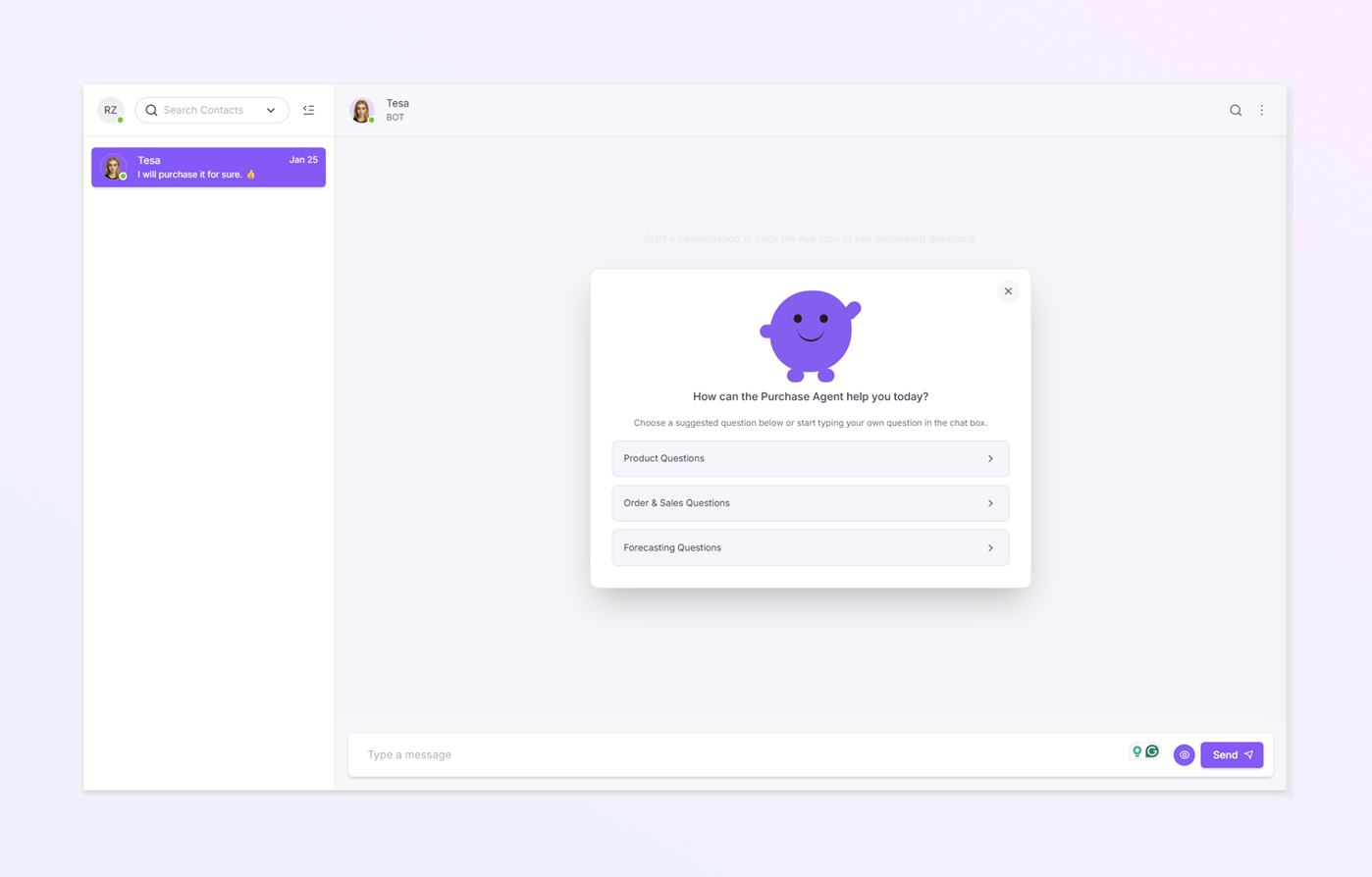
The Purchase Agent Chat page has three main areas:
-
Chat List Panel
-
Chat Header & Conversation Area
-
Message Input Area
Each part helps you manage conversations and interact with the AI easily.
Chat List Panel
The Chat List Panel is on the left side of the screen.
Here you can see:
All your previous purchase-related chats
Contact or bot name (for example: Tesa)
Last message preview
Date of last activity
Use the Search Contacts bar at the top. Quickly find older chats by name
Chat Header
At the top of the chat area, you will see:
-
Bot Name (for example: Tesa – BOT)
-
Bot profile icon
-
Icons on the right side for Search within chat and More options (⋮) for chat-related actions like view contact and clear chat history.
Chat Conversation Area
This is the main space where the conversation happens.
-
When you open the chat for the first time, the Purchase Agent greets you and shows suggested question options.
-
These are designed to help you get answers quickly without typing.
Suggested Question Options
You will see clickable options such as:
-
Product Questions
-
Order & Sales Questions
-
Forecasting Questions
How Suggested Questions Work
-
Click one of the suggested categories
-
The system shows related questions
-
Select the question closest to your need
-
The Purchase Agent replies instantly with insights or data
No typing is required unless you want to.
Sending a Message Manually
You can also ask your own questions.
-
Click inside the Type a message box at the bottom
-
Type your question in plain English
-
Click Send or press Enter
Your message is sent instantly to the Purchase Agent.