


ExactFlow Opportunities Page User Guide
The Opportunities page helps purchase teams find profitable buying opportunities from supplier price lists. By uploading a supplier sheet, the system analyzes costs, fees, VAT, and margins to show which products are worth purchasing and which ones are not.
This page is mainly used by procurement, sourcing, and purchasing teams.
How to Open the Opportunities Page
Sign in to your Exact Flow account.
From the left menu, open Purchase Agent.
Click Opportunities.
You will now see the Opportunities screen.
Purpose of the Opportunities Page
The Opportunities page allows you to:
-
Upload supplier price files (Excel or CSV)
-
Compare supplier costs against your selling conditions
-
Calculate margins automatically
-
Identify products with good profit potential
-
Avoid low-margin or loss-making purchases
It turns raw supplier data into clear buying decisions.
Saved Runs Section
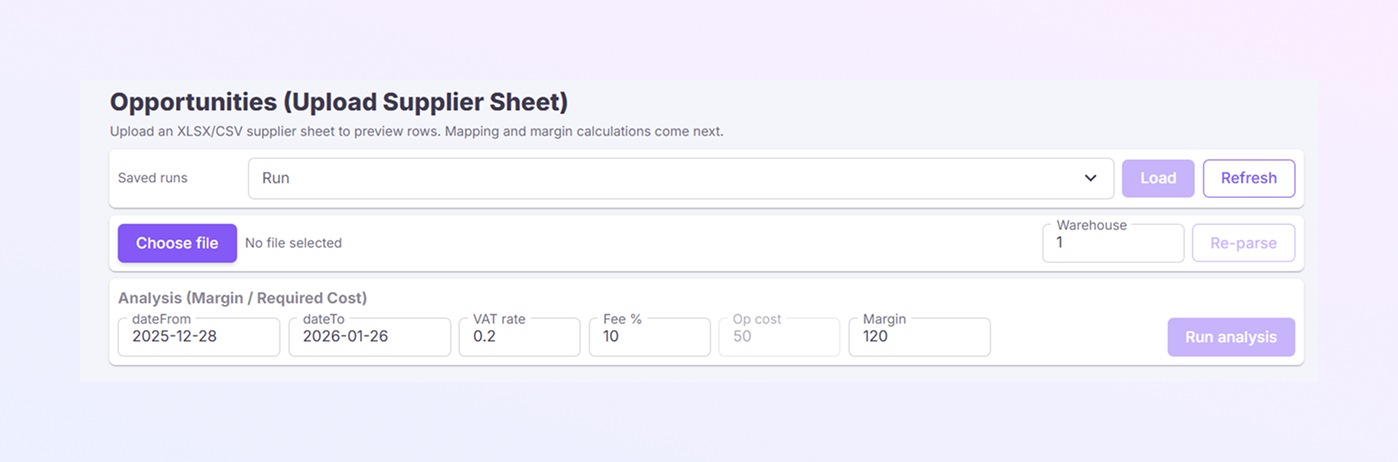
At the top of the page, you will see a Saved runs dropdown.
This allows you to load previously saved analyses
Select a saved run name from the dropdown
Click Load to reopen it
Click Refresh to update the list
This is useful when you regularly analyze the same supplier files.
Upload Supplier File
Below the saved runs section, you will see the file upload area.
-
Click Choose file
-
Upload a supplier sheet in XLSX or CSV format
-
Once selected, the file name will appear next to the button
This file usually contains Product SKU, Supplier price, and Product details.
Warehouse Selection
On the right side, you will see a Warehouse field.
-
Select the warehouse number you want to analyze
-
All cost and margin calculations will be based on this warehouse
This is important if pricing or costs vary by warehouse.
Re-parse Button
If you upload a new file, change the warehouse, and update supplier data. Click Re-parse to re-read the file and refresh the data.
Analysis Settings Section
This section controls how profit is calculated.
-
Date From / Date To: Defines the time range for the analysis. Helps align calculations with a specific business period.
-
VAT Rate: Enter your VAT percentage. Example: 0.2 means 20% VAT.
-
Fee %: Marketplace or platform fees.
-
Operational Cost: Fixed cost per unit (shipping, handling, packaging, etc.)
-
Target Margin: Desired profit margin per product.
These values are used to calculate whether a product is profitable or not.
Run Analysis Button
After setting all values:
-
Click Run analysis
-
Process the supplier file
-
Apply all costs and fees
-
Calculate margins
-
Show which products meet your target margin
The system will:
This is the key action on the page.
Opportunities Results
Once the analysis is complete, the page will display:
-
Products that meet your margin goals
-
Products that are too expensive to buy
-
Clear indicators of profitable opportunities
This helps you quickly decide what to buy, what to negotiate, and what to ignore.
Summary
The Opportunities page is a decision-making tool for purchase teams.
It helps you:
-
See real profit potential
-
Avoid bad buying decisions
-
Save time on manual calculations
-
Buy with confidence